
Field Workforce Management Software in Kenya: The Complete Guide to Tracking Mobile Teams

A sales rep says he visited twelve outlets in Thika today. A technician reports that a client’s generator was serviced in Nakuru. A rider confirms all deliveries in Westlands were made. The manager in Nairobi has no way to check any of it, so the day is reconstructed from phone calls, WhatsApp photos and a paper logbook filled in at 6 pm. Missed visits, late starts and padded mileage only show up when sales drop or a customer complains.
Field force management software in Kenya closes that gap by turning every staff phone into a GPS-verified tool for attendance, visits, tasks and reports. This guide explains what field and mobile workforce management software does, the problems it solves for Kenyan businesses with teams on the road, the features to look for and how to choose the right system.
What Is Field Workforce Management Software?
Field workforce management software (also called field force management or mobile workforce management) tracks staff who work away from the office: sales agents, merchandisers, field officers, technicians, delivery riders, inspectors and support agents. Staff use a mobile app to clock in, check in at visits, complete tasks and submit reports, while supervisors and managers see that activity live on a map and in dashboards.
It is different from GPS vehicle tracking. A vehicle tracker shows where a car or motorbike is. Field workforce management tracks the person and the work, whether they drive, ride or walk. A complete system typically covers:
- GPS attendance, with geofenced clock-in and clock-out
- Live location and route tracking, including planned versus actual routes
- Customer visits and proof of work, with photos, signatures and geo-tagged timestamps
- Task assignment and completion tracking
- Shift scheduling and handovers
- Daily field reports with supervisor approval
- Territory management and performance dashboards
Challenges Kenyan Field Teams and Managers Face
- No proof of attendance. Managers can’t tell whether field staff started work on time, or at all, without calling them.
- Skipped visits and padded reports. Outlets, clients or sites listed in a report may never have been visited, and nobody finds out until sales or service quality drop.
- Manual call-ins and paper logbooks. End-of-day reporting by phone, WhatsApp or paper is slow, inconsistent and hard to check.
- Wide territories. Teams spread across Nairobi, upcountry towns and neighbouring countries are hard to supervise, and coverage gaps go unnoticed.
- Patchy network coverage. Many field areas have weak or no data signal, so tools that only work online fail exactly where staff need them.
- Unfair performance reviews. Without data on visits, tasks and time, appraisals and incentives are based on impressions rather than results.
- Disputes with customers. When a customer says a technician never came or a delivery never arrived, there is no time-stamped evidence to settle it.
Engsoft Field and Mobile Workforce Management System: Key Features
Engsoft Field and Mobile Workforce Management System connects a mobile app for field staff with dashboards for supervisors, area managers and executives. A visit, a completed task, a shift handover or a photo of proof of work captured in the field shows up immediately in reports, replacing manual call-ins, paper logbooks and end-of-day reporting.
GPS attendance
- Mobile clock-in and clock-out with GPS and time-stamp verification
- Geofencing to confirm staff are at their designated location
- Alerts for late starts and missed clock-ins
- Attendance history and summary reports per staff member
Live location, visits and routes
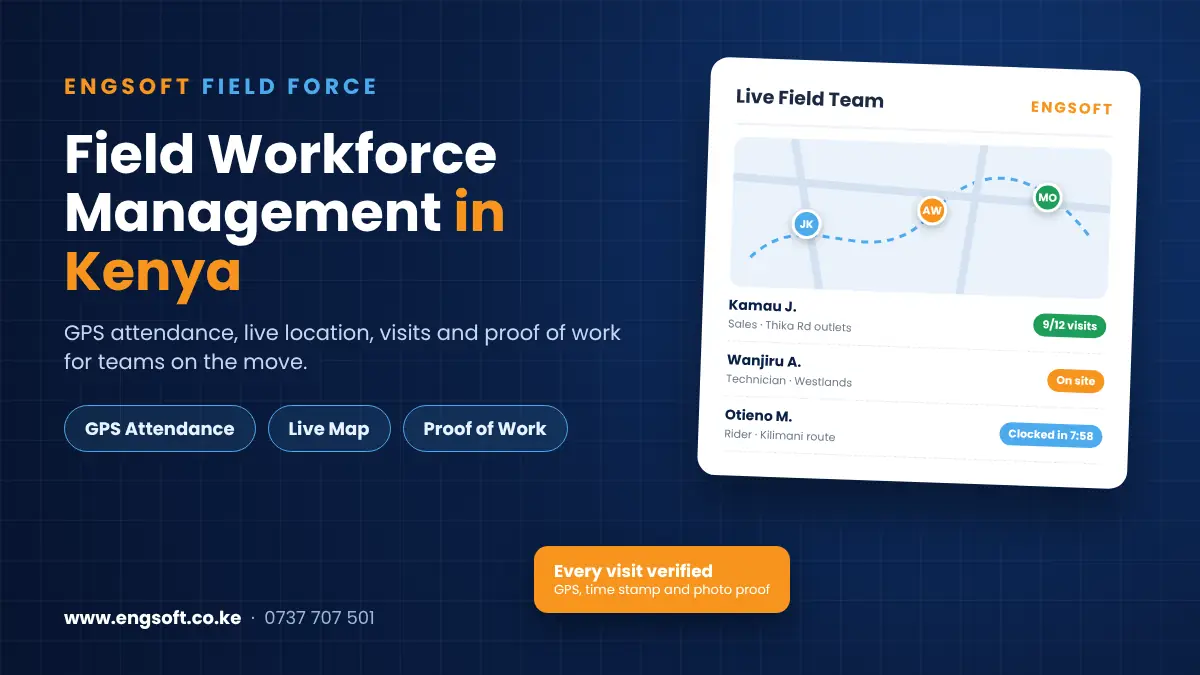
- Live map of field staff during working hours
- Planned versus actual route for each agent
- Visit check-in and check-out with location and time verification
- Route history playback for reviews and disputes
Tasks, proof of work and field reports
- Tasks created, assigned and prioritised from the management console, with bulk assignment for recurring work
- Task status from assigned to in progress, completed or escalated, with overdue flags
- Photos, signatures and documents captured as proof of work, time-stamped and geo-tagged
- Visit history per customer for supervisors and account owners
- Report templates by role, with supervisor review, comments and approval
Shift scheduling and handovers
- Shifts by team, role or territory, including multiple and overlapping shifts
- Shift swap and cover requests with approval
- Structured handover notes between outgoing and incoming shifts
- Late arrival, no-show and early-departure tracking
Territories, communication and performance
- Territories and zones, with coverage maps and visit-density heatmaps
- Workload rebalancing and coverage-gap reports
- In-app messaging, broadcast announcements and an escalation workflow
- Scorecards and rankings by agent, team and territory, exportable for appraisals and incentives
Mobile app built for field conditions
- Offline data capture that syncs when the connection returns
- Push notifications for new tasks, messages and schedule changes
- A simple, low-bandwidth design suited to varied network conditions
Dashboards for every level
- Field Officer app: daily tasks, visits, route, clock-in, shift notes and a personal summary of visits, tasks and distance covered
- Supervisor / Area Manager dashboard: live team map, task tracking, escalations, attendance and territory coverage analytics
- Admin / Executive dashboard: organisation-wide attendance exceptions, report approvals, configuration, productivity KPIs by region and cost-to-serve indicators
Works With the Wider Engsoft Platform
- Payroll and HRMS: field attendance can flow into Engsoft Payroll and the HR system, so hours worked away from the office are paid correctly.
- Biometric time attendance: office and warehouse staff clock in by fingerprint, field staff clock in by GPS, so every employee’s attendance is covered.
- Helpdesk and ticketing: service tickets can be dispatched to technicians in the field, who close them out with proof of work.
Who Is It For?
- FMCG sales and merchandising teams visiting outlets, distributors and supermarkets across territories
- Service and maintenance companies with technicians on customer sites, from generators and solar to CCTV, lifts and ICT
- Delivery and logistics businesses with riders and drivers on fixed or changing routes
- Banks, SACCOs, microfinance and insurance firms with loan officers and agents in the field
- Agribusiness, NGOs and county programmes with extension officers, enumerators and inspectors
- Security firms and facility managers running guards and staff on shifts across many sites
How to Choose Field Workforce Software in Kenya: A Checklist
Before you buy, check that the system:
- Verifies attendance by GPS and geofence, not just a tap on a button.
- Works offline, saving data in low-coverage areas and syncing later.
- Captures proof of work, with photos, signatures and geo-tagged timestamps on every visit.
- Compares planned and actual routes, so skipped visits are easy to spot.
- Handles shifts and handovers, if your teams work in shifts.
- Lets supervisors review and approve field reports in the app.
- Manages territories, with coverage maps and workload rebalancing.
- Produces fair performance data for appraisals and incentives.
- Feeds attendance into payroll and HR, so field hours aren’t re-entered.
- Comes with local training and support, including help rolling the app out to staff phones.
Why Choose Engsoft?
- 10 years delivering business systems in Kenya
- 100+ clients across 8 countries in Africa, and 18 systems from one vendor
- Built for every kind of field team: sales, service, delivery, inspection and support, not just FMCG sales reps
- Connected to payroll, HR and biometric attendance, so office and field staff are managed in one place
- Local implementation, training and support from our Nairobi office
Frequently Asked Questions
What is field workforce management software?
It is software that tracks staff who work away from the office, such as sales agents, technicians, riders and inspectors, recording their attendance, location, tasks, visits and reports in real time through a mobile app and management dashboards.
How does GPS attendance work for field staff?
Staff clock in and out on the mobile app with GPS and time-stamp verification. Geofences confirm they are at the designated location, and supervisors get alerts for late starts or missed clock-ins.
Can managers see where field staff are in real time?
Yes. Supervisors see a live map of their team during working hours, planned versus actual routes, and time-stamped, geo-tagged visit check-ins and check-outs.
How do field staff prove a visit or job was done?
Each customer visit can be logged with photos, signatures and documents, all time-stamped and geo-tagged, giving verifiable proof of work.
Does the mobile app work without internet?
Yes. Staff can keep recording visits and reports in low-coverage areas, and the data syncs when they reconnect.
How is it different from GPS vehicle tracking?
Vehicle trackers show where a car or motorbike is. Field workforce management tracks the person and the work: attendance, customer visits, tasks completed, proof of work, shift handovers and daily reports, whether the staff member drives, rides or walks.
Can field attendance feed payroll?
Yes. Field attendance can flow into Engsoft Payroll and the HRMS, and it complements office-based biometric time attendance.
How much does field force management software cost in Kenya?
The price depends on the number of field staff, supervisors and modules you need. Call or WhatsApp 0737 707 501 or book a free demo, and we will recommend the right setup and send a quote.
Book a Free Demo
See how Engsoft Field and Mobile Workforce Management System can show you where your field teams are, what they’ve done and how well they’re performing.
- Call or WhatsApp: 0737 707 501
- Email: info@engsoft.co.ke
- Visit: Repen Complex, Mombasa Road – Katani Road Junction, Nairobi (Mon–Fri 8:00–17:00, Sat 9:00–13:00)
Request a demo of the Field and Mobile Workforce Management System →