Project Management Software in Kenya: The Complete Guide to Agile Project and Task Management

In many Kenyan organisations, a project lives in five places at once: a spreadsheet of tasks, a WhatsApp group for updates, email threads for approvals, a shared folder of documents and the project manager’s head. Deadlines slip quietly, nobody is sure who is overloaded, and the weekly status meeting is spent finding out what happened last week.
Modern project management software in Kenya brings all of this into one place. This guide explains what project management software does, the problems it solves for Kenyan teams, the features to look for, and how to choose a system your team will actually use.
What Is Project Management Software?
Project management software is a system teams use to plan projects, assign and track tasks, manage deadlines, collaborate and report on progress. Instead of chasing updates, everyone works from the same board, and managers see in real time where each project stands.
It is broader than task management software, which only tracks individual to-dos. A full project management system also covers:
- Agile planning: backlogs, sprints and Kanban boards
- Workflows: custom task stages and rules for each team or project type
- Time tracking: hours logged against tasks and projects
- Team communication: chat channels tied to projects, so updates stay with the work
- Documentation: a knowledge base for SOPs and project files
- Resource and capacity planning: who is overloaded and who has room
- Reporting: sprint progress, completion rates and bottlenecks across the organisation
Challenges Kenyan Project Teams Face
- Scattered tools. Tasks in spreadsheets, updates on WhatsApp, files in email. Nothing is linked, so context gets lost.
- No real-time visibility. Managers only learn a deadline has slipped at the next meeting, when it is already too late to fix cheaply.
- Uneven workloads. Some people are overloaded while others wait for work, and nobody can see it until someone burns out or a project stalls.
- Unknown effort. Without time tracking, it is hard to tell how long work really takes, price the next project, or report hours to clients and donors.
- Lost knowledge. SOPs and project documents sit in personal folders, so new team members start from scratch.
- Paying for several foreign tools. Teams often pay separately in dollars for a task tracker, a chat tool and a documentation tool, with no local support.
Engsoft Project Management Software: Key Features
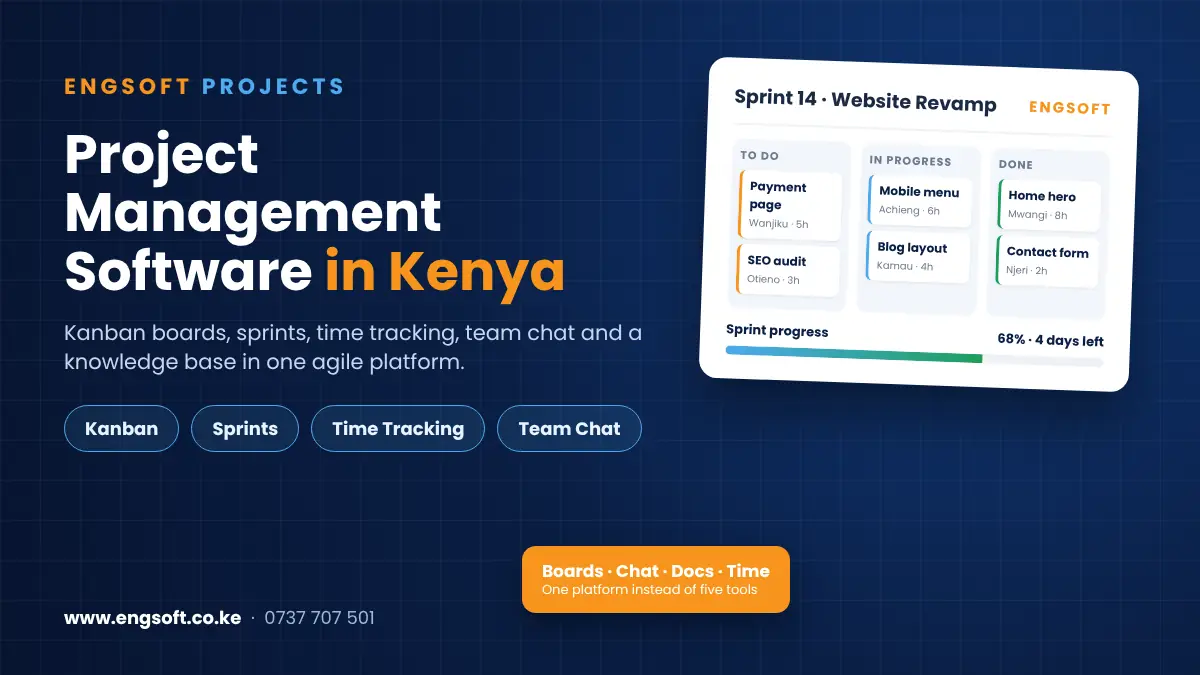
Engsoft Project Management Software is an agile project management system that combines task management, team chat, time tracking and documentation in one platform. It has two dashboards: an Employee Dashboard for the people doing the work, and an Admin Dashboard for project leads and managers. A task moved on a board, an hour logged or a message sent shows up immediately in team and organisation-wide reports.
Kanban boards, backlogs and sprints
- Drag-and-drop Kanban boards with configurable columns
- Jira-style backlog grooming, sprint planning and sprint boards
- Sprint templates and custom workflows by team or project type
- Burndown and velocity tracking to see sprint progress against scope
- Work logs and comment threads inside each task
- AI task suggestions based on each person’s role, workload and sprint phase
Built-in team chat
- Channels by project, team or department, similar to Slack
- Threaded replies to keep conversations in context
- Moderation tools and archived channels
Time tracking
- Log hours against tasks or as ad-hoc entries
- Weekly summaries of where time went across tasks and projects
- Calendar sync and performance trends over time
Knowledge base
- Company SOPs and project documentation in one place, with global search
- Read, edit and share permissions, plus version history
- Documents linked directly to the tasks they relate to
Resource and capacity planning
- Compare workload and communication volume across teams such as design, development, marketing and management
- Spot over- and under-allocated teams before they become bottlenecks
Templates and automation
- Reusable task and sprint templates for recurring work
- Tasks created automatically based on project stage or team needs
Admin dashboard and reports
- Create projects, assign leads and set deadlines
- Form cross-functional teams and see every member’s role, workload and logged time
- Sprint reports, task completion tracking and bottleneck identification
- Company branding, notification settings, and access control by role
Integrations and the Wider Engsoft Platform
- Calendar sync: deadlines, meetings and logged time appear in personal calendars.
- HR management system: link people, roles and departments with Engsoft HRMS.
- Ticket management and helpdesk: handle support requests and turn issues into project work.
- Field and mobile workforce: coordinate staff working on sites and in the field.
- Document tools: integration points for the document systems your organisation already uses.
Who Is It For?
- Software and IT teams running Scrum or Kanban, who want a Jira-style tool with built-in chat
- Engineering and construction teams tracking tasks, deadlines and site work
- Marketing and creative agencies juggling client campaigns and deliverables
- NGOs running donor-funded projects, who need to track hours and progress for reporting
- Consultancies and professional services firms that bill or report by time spent
- Project management offices (PMOs) coordinating projects across several departments
How to Choose Project Management Software in Kenya: A Checklist
- Fits how your team works: Kanban, Scrum sprints, or a mix, with workflows you can configure.
- Keeps chat with the work, so updates don’t get lost in WhatsApp groups and email.
- Tracks time against tasks, for client billing, donor reporting and better estimates.
- Shows workload and capacity for every team member, not just task lists.
- Holds your documentation, with search, permissions and version history.
- Reports in real time, with sprint progress, completion rates and bottlenecks.
- Controls access by role and can carry your company branding.
- Integrates with calendars and HR, so people data isn’t entered twice.
- Is easy to adopt, with templates that cut setup time for every new project.
- Comes with local support and training, from a vendor you can visit and call.
Why Choose Engsoft?
- 10 years delivering business systems in Kenya
- 100+ clients across 8 countries in Africa, and 18 systems from one vendor
- One platform instead of several tools: boards, sprints, chat, time tracking and documentation in a single system
- Local implementation, training and support from our Nairobi office
- Works with the rest of Engsoft, including HRMS, helpdesk and field workforce management
Frequently Asked Questions
What is project management software?
It is a system teams use to plan projects, assign and track tasks, manage deadlines, collaborate and report on progress. Engsoft’s version combines Kanban boards, sprints, time tracking, team chat and a knowledge base in one agile platform.
Is Engsoft a good Jira alternative for teams in Kenya?
Yes. It brings Jira-style backlogs, sprint planning and sprint boards together with Slack-style team channels, time tracking and a knowledge base, so teams don’t need separate tools for planning, chat and documentation.
Does it support agile, Scrum and Kanban?
Yes. Teams can work on drag-and-drop Kanban boards, groom backlogs, plan sprints with templates, set custom workflows and follow progress with burndown and velocity tracking.
What is the difference between project management and task management software?
Task management software tracks individual to-dos. A project management system also covers sprints, workflows, resource and capacity planning, time tracking, team communication and organisation-wide reporting.
Can managers see each team member’s workload and time spent?
Yes. The Admin Dashboard shows each employee’s role, workload and logged time. Weekly summaries, capacity planning and cross-team comparison help spot over- and under-allocated teams early.
Does it have AI features?
Yes. AI task suggestions recommend work based on each person’s role, current workload and the sprint phase.
Can it integrate with our HR, calendar and document tools?
Yes. It has integration points for calendar, HR and document tools, including calendar sync, and it works alongside Engsoft HRMS.
How much does project management software cost in Kenya?
Pricing depends on your number of users and the setup you need. Call or WhatsApp 0737 707 501 or request a demo, and we will quote for your team.
Book a Free Demo
See how Engsoft Project Management Software can bring your boards, chat, time tracking and documents into one place.
- Call or WhatsApp: 0737 707 501
- Email: info@engsoft.co.ke
- Visit: Repen Complex, Mombasa Road – Katani Road Junction, Nairobi (Mon–Fri 8:00–17:00, Sat 9:00–13:00)