

The Visitor Management System (VMS) is a comprehensive, web-based platform designed to digitise and streamline every stage of the visitor experience: from initial appointment booking through to departure and post-visit reporting. The system is suited for facilities of all sizes, including corporate offices, hospitals, schools, government buildings, and industrial sites.
By replacing paper-based logbooks and manual sign-in processes, the VMS delivers improved security, a professional and welcoming visitor experience, real-time visibility of who is on-site, and a complete record of all visits for compliance and audit purposes. The system supports two visitor flows: pre-booked visitors who receive a personalised booking link and QR code before they arrive, and walk-in visitors whose details are captured at the gate or reception desk upon arrival.
Our Visitor Management System module manages the movement of people entering the Organization. Benefits of tracking visitors who may be customers, clients, supply personnel, interviewees, service providers, and more. A visitor management system represents all the procedures and activities an organization has set in place to handle visitor movement, from beginning to end, as part of the visitor interface. Integrates with walkthrough scanners, alarm systems, and security systems
Engsoft Visitor Management System is a mobile and web-based application that provides comprehensive visitor registration, tracking, reporting, and access control integration to track visitors effectively and efficiently in commercial and residential premises.
Our Visitor Management System module is integrated with the Access Control Module, turnstiles, and biometric access control. This facilitates the control, recording, and tracking of visitors. Features are entry registration, exit registration, and visitor reservation.
Visitor Management System Overview
The VMS is a fully web-based system accessible from any internet-connected computer or tablet — no software installation is required. It is made up of three main areas:
Admin & Management Portal– A browser-based dashboard for administrators and security staff to manage visitors, view records, configure the system, and generate reports.
Visitor Booking Portal – A clean, easy-to-use webpage where invited visitors complete their preregistration and receive their QR code pass.
Gate / Reception Screen– A dedicated screen at entry points used by security and reception staff to register walk-in visitors and scan QR codes for pre-booked arrivals.
Appointment Booking & Visitor Invitations
The booking module allows staff to schedule visits in advance and send personalized booking links to expected guests — giving visitors everything they need before they even arrive at the gate.
Creating a Visit
Any registered staff member can create a visit request directly from the dashboard. When making a booking, the staff member provides:
The Visitor Booking Link
Once a visit is created, the system automatically sends a personalized link to the visitor by email and/or SMS.
The visitor clicks the link and is taken to a simple, mobile-friendly form where they can:
Once the form is complete, the visitor receives a confirmation email with a summary of their visit and a unique QR code that acts as their entry pass — valid only for the approved date and entry point.
Booking Link Features
Secure & Time-Limited Links – Each booking link is unique to the visitor and automatically expires after the visit window to prevent misuse.
Branded Visitor Experience
The visitor-facing booking page reflects the facility’s identity for a professional first impression.
QR Code Entry Passes
Every pre-registered visitor receives a unique QR code that serves as their entry pass. This makes arrival quick, contactless, and fully recorded.
How QR Codes are Issued
What Happens at the Gate
Entry points are equipped with a QR code scanner connected to the VMS. When a visitor presents their QR code, the system instantly checks:
Check What the System Does
Identity Confirmation– The visitor’s pre-registered details are retrieved and displayed for the security officer to verify.
Valid Date & Time -Confirms the visitor is arriving within their approved time window.
Correct Entry Point -Checks that the visitor is at the right gate for their visit.
Not Already Used -Prevents the same QR code from being used more than once.
Host Notification– The host is notified by email that their visitor has arrived.
Gate Access– Where connected, the system can trigger an automatic gate or door
release.
Self-Service Walk-In Kiosk
A self-service screen at the entrance allows walk-in visitors to register themselves quickly without needing to queue at a desk:
Alerts & Notifications
Visitor Arrived – Host is notified by email when their visitor successfully checks in at the gate.
Visitor Overstay -Security is alerted when a visitor remains on-site beyond their approved visit time.
Denied Entry Match– An immediate alert is raised if a visitor’s details match the facility’s denied entry list.
Capacity Warning -An alert is triggered when the number of visitors on-site reaches a set limit.
Repeated Failed Scans -Security is notified if multiple unsuccessful scan attempts occur at a gate.
Emergency Evacuation -A single-click report lists every visitor currently on-site for an emergency roll call.
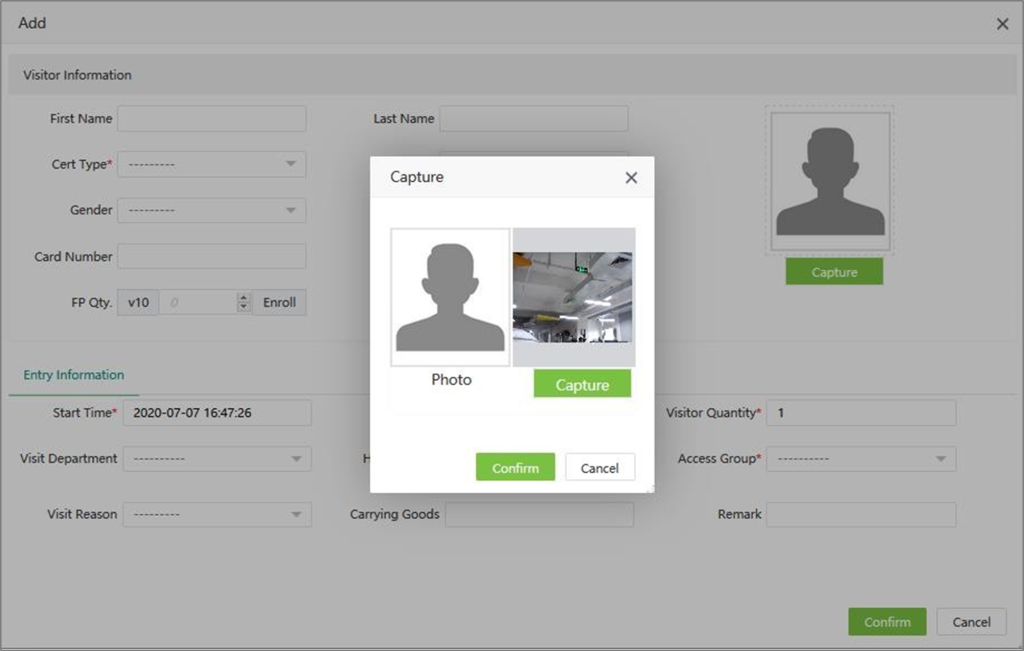
Visitor ID: Displays the identical number of the visitor.
Name, Gender, and Visiting Company: Displays details of visitor and employing company.
Cert Type: Displays the type of document submitted by the visitor for proof (Passport, National ID, driving license, Approval note from the company, etc.).
Cert No: Displays the identical number of the proof document submitted by the visitor.
Status: Displays the status as “Entered” after successful registration.
Create Time: Displays the registration created time.
Exit Time: Displays the time exited by the visitor.
Cert Type ID: Displays the visitor’s submitted proof document’s type ID.
Department Visited and Access group, levels: Displays the area or the sector where the visitor visits.
Host/Visited: Displays the host’s Employee ID, who escorts or meets the visitor.
Visit Reason: Displays the visitor’s reason for visiting the Organization.
Carrying Goods: Displays the details of the belongings of the visitor.
Visitor Quantity: Displays the total count of visitors escorted by a host.
Biometric Quantity: Registers biometric elements like fingerprint or face if the visitor requires the same for access.

We are glad that you preferred to contact us. Please fill our short form and one of our friendly team members will contact you back.